Contrast Analyser, Version 2.2
Support Contrast Analyser development
Support has been provided in part by the National Institute on Disability and Rehabilitation Research via the Trace Center under grant # H133E030012
What is the Contrast Analyser?
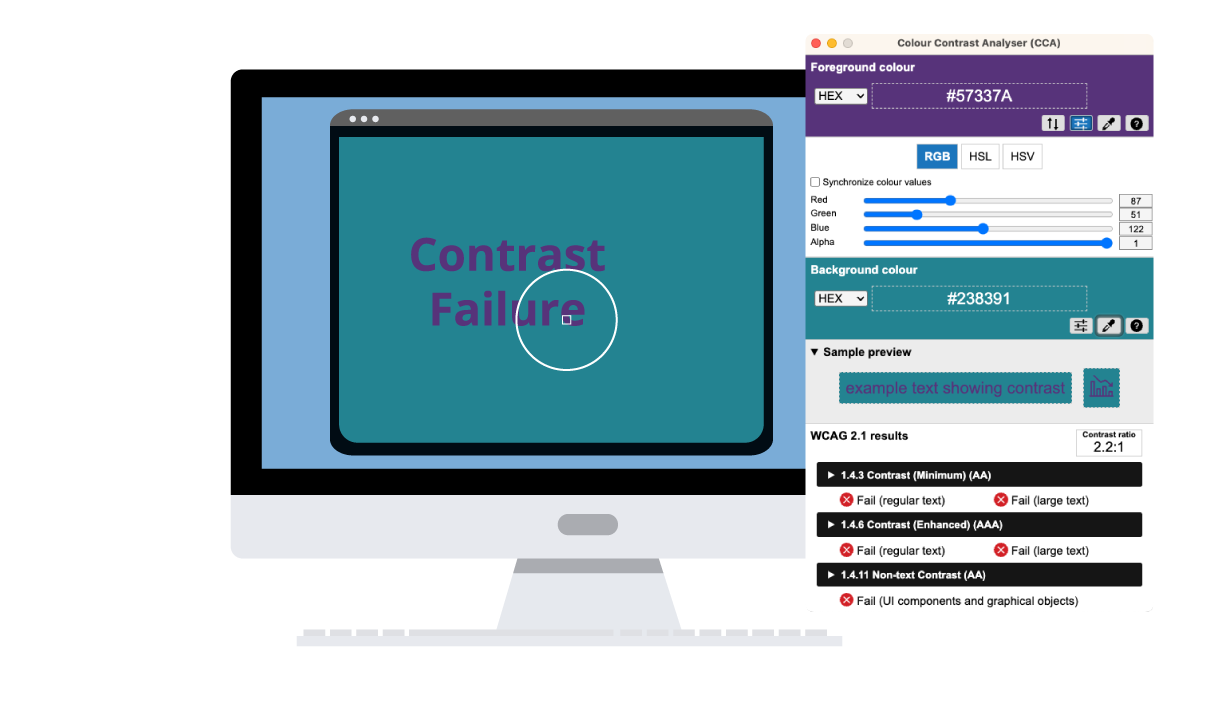
It is primarily a tool for checking foreground & background colour combinations to determine if they provide good colour visibility. It also contains functionality to create simulations of certain visual conditions such as colour blindness.
Determining "colour visibility" is based on the Contrast Ratio algorithm, suggested by the World Wide Web Consortium (W3C):
Note:The contrast ratio is now a W3C recommendation (December 2008), to help determine whether or not the contrast between two colours can be read by people with colour blindness or other visual impairments.
Contrast Ratio
Measure the relative luminance of each letter (unless they are all uniform) using the formula:
- L = 0.2126 * R + 0.7152 * G + 0.0722 * B where R, G and B are defined as:
- if RsRGB <= 0.03928 then R = RsRGB/12.92 else R = ((RsRGB+0.055)/1.055) ^ 2.4
- if GsRGB <= 0.03928 then G = GsRGB/12.92 else G = ((GsRGB+0.055)/1.055) ^ 2.4
- if BsRGB <= 0.03928 then B = BsRGB/12.92 else B = ((BsRGB+0.055)/1.055) ^ 2.4
- and RsRGB, GsRGB, and BsRGB are defined as:
- RsRGB = R8bit/255
- GsRGB = G8bit/255
- BsRGB = B8bit/255
The "^" character is the exponentiation operator.
Note: For aliased letters, use the relative luminance value found two pixels in from the edge of the letter.
back to topColour Brightness Formula
Colour brightness is determined by the following formula:
((Red value X 299) + (Green value X 587) + (Blue value X 114)) / 1000
The difference between the background brightness, and the foreground brightness should be greater than 125.
Note: This algorithm is taken from a formula for converting RGB values to YIQ values. This brightness value gives a perceived brightness for a colour.
Colour Difference Formula
Colour difference is determined by the following formula:
(maximum (Red value 1, Red value 2) - minimum (Red value 1, Red value 2)) + (maximum (Green value 1, Green value 2) - minimum (Green value 1, Green value 2)) + (maximum (Blue value 1, Blue value 2) - minimum (Blue value 1, Blue value 2))
The difference between the background colour and the foreground colour should be greater than 500.
Uses
The Contrast Analyser (CA) is useful to help determine, in particular, the legibility of text on a web page and the legibility of image based representations of text.
Guideline 1.4 Distinguishable: Make it easier for users to see and hear content including separating foreground from background. WCAG 2.0
Guideline 1.4.3: Contrast (Minimum)- WCAG 2 The visual presentation of text and images of text has a contrast ratio of at least 4.5:1, except for the following:
- Large Text: Large-scale text and images of large-scale text have a contrast ratio of at least 3:1;
- Incidental: Text or images of text that are part of an inactive user interface component, that are pure decoration, that are not visible to anyone, or that are part of a picture that contains significant other visual content, have no contrast requirement.
- Logotypes: Text that is part of a logo or brand name has no minimum contrast requirement. (Level AA)
Guideline 1.4.6: Contrast (Enhanced) - WCAG 2 The visual presentation of text and images of text has a contrast ratio of at least 7:1, except for the following: (Level AAA)
- Large Text: Large-scale text and images of large-scale text have a contrast ratio of at least 4.5:1;
- Incidental: Text or images of text that are part of an inactive user interface component, that are pure decoration, that are not visible to Logotypes: Text that is part of a logo or brand name has no minimum contrast requirement.
Assessing conformance with Checkpoint 2.2 of the Web Content Accessibility Guidelines 1.0
Checkpoint 2.2 of the WCAG 1.0 requires that "foreground and background colour combinations provide sufficient contrast when viewed by someone having colour deficits, or when viewed on a black and white screen."
Use the CCA to test colour combinations against the W3C's suggested algorithm for determining "sufficient contrast".
back to topUsing the CA
The documentation is in the process of being written, for the most part, using the CA is similar to the Luminosity Contrast Ratio Analyser and CCA 1.1 refer to using the CCA 1.1
The main differences are:
- The implementation of the updated contrast ratio algorithm
- The interface now has options to show and hide, the colour sliders, and result details.
- the colour picker sample size can be modified from 1 pixel to 8 x 8 pixels
Terms of Use Notice:
The Contrast Analyser 2.2 is Freeware.
By accessing or using the Contrast Analyser 2.0, you acknowledge that you have read, understood and agree to be bound by the Contrast Analyser 2.0 Terms of Use.
You may use the Contrast Analyser 2.2 Software (the "Software") for your personal or commercial use to help you determine the accessibility of your Web content.
THIS SOFTWARE IS BEING PROVIDED "AS IS", WITHOUT ANY EXPRESS OR IMPLIED WARRANTY. IN PARTICULAR, THE WEB ACCESSIBILITY TOOLS CONSORTIUM (WAT-C) DOES NOT MAKE ANY REPRESENTATION ORWARRANTY OF ANY KIND CONCERNING THE RELIABILITY, QUALITY, OR MERCHANTABILITY OF THIS SOFTWARE OR ITS FITNESS FOR ANY PARTICULAR PURPOSE. ADDITIONALLY, WAT-C DOES NOT GUARANTEE THAT USE OF THIS SOFTWAREWILL ENSURE THE ACCESSIBILITY OF YOUR WEB CONTENT OR THAT YOUR WEB CONTENT WILL COMPLY WITH ANY SPECIFIC WEB ACCESSIBILITY STANDARD.
We value all feedback received. Please contact us about any functionality that may not work or other suggestions for improvement by emailing sfaulkner@paciellogroup.com.

This work is licenced under a Creative Commons Licence
Download and Installation Instructions
Please Note:
System Requirements
- Tested on Windows 2000, XP and Vista
Download
For anybody interested in providing a translation the translation file can be downloaded. Please contact sfaulkner@paciellogroup.com if you have any questions about the translations for the Windows version, otherwise send Steve the completed files so they can be added to the installation.
- English version: Updated Contrast Analyser 2.2 (ZIP, 363KB)
- Chinese (traditional) version: Updated Contrast Analyser (Traditonal Chinese) version (zip, 367 kb)
- Versione italiana: Updated Contrast Analyser - Versione 2.2
- version francaise: Updated telechargement version francaise (ZIP, 363KB)
- Versión espańola: información sobre el Analizador de Color 2.0
- Czech version Updated Analyzér kontrastu barev verze 2.0
- deutsche Version: Updated Farbe Kontrast-Analysator 2.0
Installation instructions
Download, unzip and place the CA folder where you like. Use the application by activating the ContrastAnalyser2.exe file.
Contrast Analyser for APPLE MAC: download and installation instructions
A MAC version of the Contrast Analyser has been developed by Cedric Trevisan (TPG). The interface is similar to the windows version.
Note: at this stage the CCA MAC does not have the image simulation features found in the windows version.
Download the Updated CCA for MAC (1 mb .dmg file) - English, French, German, Italian,Swedish and Tradional Chinese, Universal Binary.
System Requirements: Mac OS X 10.4.6 or later.
For anybody interested in providing a translation the translation kit can be downloaded. Please contact Cedric Trevisan if you have any questions about the translations for the MAC version, otherwise send Cedric the completed files so they can be added to the installation.
About
The Contrast Analyser was developed by JUn of the Web Accessibility Tools Consortium (wat-c) in collaboration with Steve Faulkner of TPG (Europe) and wat-c.
MAC version developed by Cedric Trevisan of TPG (Europe) and wat-c.
To provide feedback on the Contrast Analyser
Email Steve Faulkner [sfaulkner@paciellogroup.com]
back to top